Multi-homing
Up to this point, the app has had several surfaces, but none of them were workspace-dependent. home, auth, account, and console all live outside any workspace slug.
This chapter changes that. We turn the app into a workspace-aware application and install the packages that add the first real workspace surfaces.
If you are rebuilding this chapter from scratch, the cleanest setup is to start with a workspace-capable tenancy mode from day 0. If you are literally continuing from the previous chapter, you can still move the existing app from none to personal, but that retrofit has to be done in the right order.
Tenancy modes
JSKIT currently accepts three tenancy modes:
none- no workspace routing
- no
/w/[workspaceSlug]surfaces - useful for a purely global app with no workspace concept
personal- workspace routing is enabled
- each user gets one auto-provisioned personal workspace
- the workspace slug is derived from the user's identity and treated as immutable
- creating additional workspaces is off by default
workspaces- workspace routing is enabled
- users can belong to multiple named workspaces
- workspace slugs are user-selected rather than derived from the username
- auto-provisioning is off by default, and self-creation is a separate policy choice
Both personal and workspaces are workspace-capable modes, so they allow the workspace package descriptors to install the full workspace scaffold.
This chapter teaches personal, not workspaces.
That is deliberate. personal gives the guide a much better first-run experience because the first workspace is auto-provisioned for the user. The app still becomes multi-homing-capable, because invitations and memberships can still put one user in several workspaces at once. The personal part only changes how the first workspace is provisioned and how its slug policy works.
Once workspaces-core and workspaces-web are installed, the baseline workspace invitation flow is already part of the package stack. Treat that as the default behavior unless the app explicitly needs custom invite rules or custom UI beyond what the packages already provide.
Recap from previous chapters
To recreate the previous chapter's package set in a fresh app that is already ready for workspace routing, run:
DB_HOST=127.0.0.1
DB_PORT=3306
DB_NAME=exampleapp
DB_USER=exampleapp
DB_PASSWORD=secret

npx @jskit-ai/create-app exampleapp --tenancy-mode personal
cd exampleapp
npm install

npx jskit add package auth-provider-local-core
npx jskit add package auth-web
npx jskit add package database-runtime-mysql \
  --db-host "$DB_HOST" \
  --db-port "$DB_PORT" \
  --db-name "$DB_NAME" \
  --db-user "$DB_USER" \
  --db-password "$DB_PASSWORD"
npx jskit add package users-web
npx jskit add package console-web
npm install
npm run db:migrate
If you are already continuing from the previous chapter, you do not need to rebuild the app from scratch. Read the textbox below first, then continue with the workspace package install.
Installing the workspace packages
If your app is already on tenancyMode = "personal", run:
npx jskit add package workspaces-core
npm install
npx jskit add package workspaces-web
npm install
npm run db:migrateworkspaces-core adds the server-side workspace runtime and schema migrations. workspaces-web adds the workspace-facing client surfaces, shell placements, and app-owned route files.
If you want to inspect that package before installing it, this is a very good moment to use the CLI chapter's inspection command:
npx jskit show @jskit-ai/workspaces-web --detailsThat output makes the package feel much less mysterious, because it shows the exact workspace shell contributions, settings outlets, client tokens, app-owned file writes, and capability requirements before you mutate the app.
What workspaces add
This chapter is where the app stops being a collection of global surfaces and starts supporting workspace-dependent ones.
Two new workspace surfaces appear
After the install, the app gains:
- an
appsurface rooted at/w/[workspaceSlug] - an
adminsurface rooted at/w/[workspaceSlug]/admin
These are real surfaces, not only pages.
appis the generic workspace surface that normal authenticated workspace members can useadminis the richer workspace administration surface
That distinction matters.
The app surface is the "normal" workspace area. It is where you would usually put the main member-facing experience for that workspace: dashboards, documents, tasks, project views, customer-facing content, or whatever the ordinary in-workspace product actually is.
The admin surface is where the workspace is managed. It is the natural place for things like:
- inviting other users into the workspace
- managing members and roles
- editing workspace settings
- running workspace-specific admin tools
So admin is not just "another page." It is the surface where the workspace itself is configured and operated.
There is also no rule that says every app must use these two surfaces in the same way.
- In one app,
appcould be the real product andadmincould be the backend for managing it. - In another app,
adminmight be where most of the real work happens, whileappstays minimal or even almost empty. - In a storefront-style app,
appcould be the workspace's visible shop area andadmincould be the merchant backend.
The important point is not the label. The important point is the split:
appis the general workspace-facing surfaceadminis the management and control surface for that workspace
That is why this chapter feels larger than the previous ones. It is not just adding another route. It is adding a new routing topology.
The shell and account surface gain workspace-aware controls
The placement registry gets a workspace selector in shell.identity, pending-invites and workspace tools in shell.status, and an Invites section in the existing /account settings screen through the account-settings extension seam that users-web exposes. The default shell topology maps identity/status placements to the visible shell chrome.
That means the shell itself starts adapting to workspace context.
- on any authenticated surface, the shell can expose a workspace selector
- signed-in users can see a pending-invites cue without
users-webowning that workspace feature - on admin workspace surfaces, the shell can expose workspace-specific tools and settings
This is the first time the guide shows the shell reacting not just to authentication state, but to workspace state as well.
The database schema grows real multi-workspace tables
workspaces-core adds the schema needed for:
- workspaces
- workspace memberships
- workspace settings
- workspace invites
That is why npm run db:migrate is required again in this chapter. The workspace runtime is not only client-side routing. It is persistent tenancy data.
Existing surfaces do not disappear
This is also important to notice:
homestill existsauthstill existsaccountstill existsconsolestill exists
The new workspace surfaces are added on top of the existing app, not instead of it.
That is exactly what multi-homing should feel like. The app has both:
- global surfaces
- workspace-scoped surfaces
What to look at in the browser
Start both processes again:
npm run dev
npm run server
After you sign in, the app has the routing structure needed for workspace-aware paths such as:
/w/your-personal-slug
/w/your-personal-slug/admin
In personal mode, the first workspace is auto-provisioned for the signed-in user, so you should have a real workspace route to open immediately after login. Later, if the same user is invited into another workspace, routes such as /w/acme can exist alongside that personal workspace too.
At this stage of the guide, the starter workspace pages are still intentionally simple. That is helpful. It lets you see the new routing and shell topology clearly before later chapters add real modules inside those surfaces.
The most important new visible ideas are:
- a workspace slug appears in the route
- the shell can expose workspace selection and workspace tools
- workspace-dependent surfaces can show a dedicated unavailable-state card when the requested workspace cannot be resolved
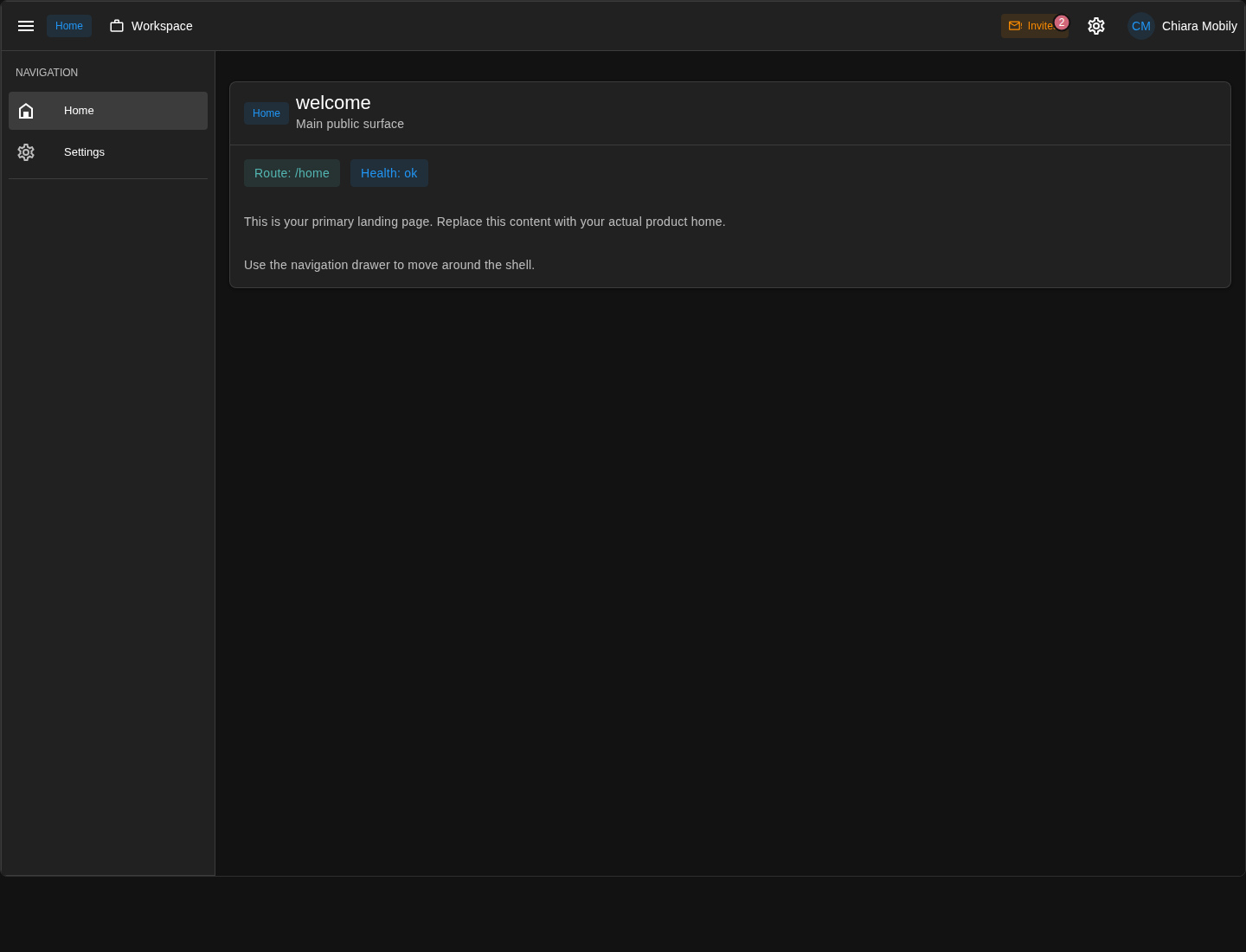
First, even the global /home surface reacts to workspace state. The selector and invites cue come from semantic placement entries and workspace bootstrap context, not from the home page itself.
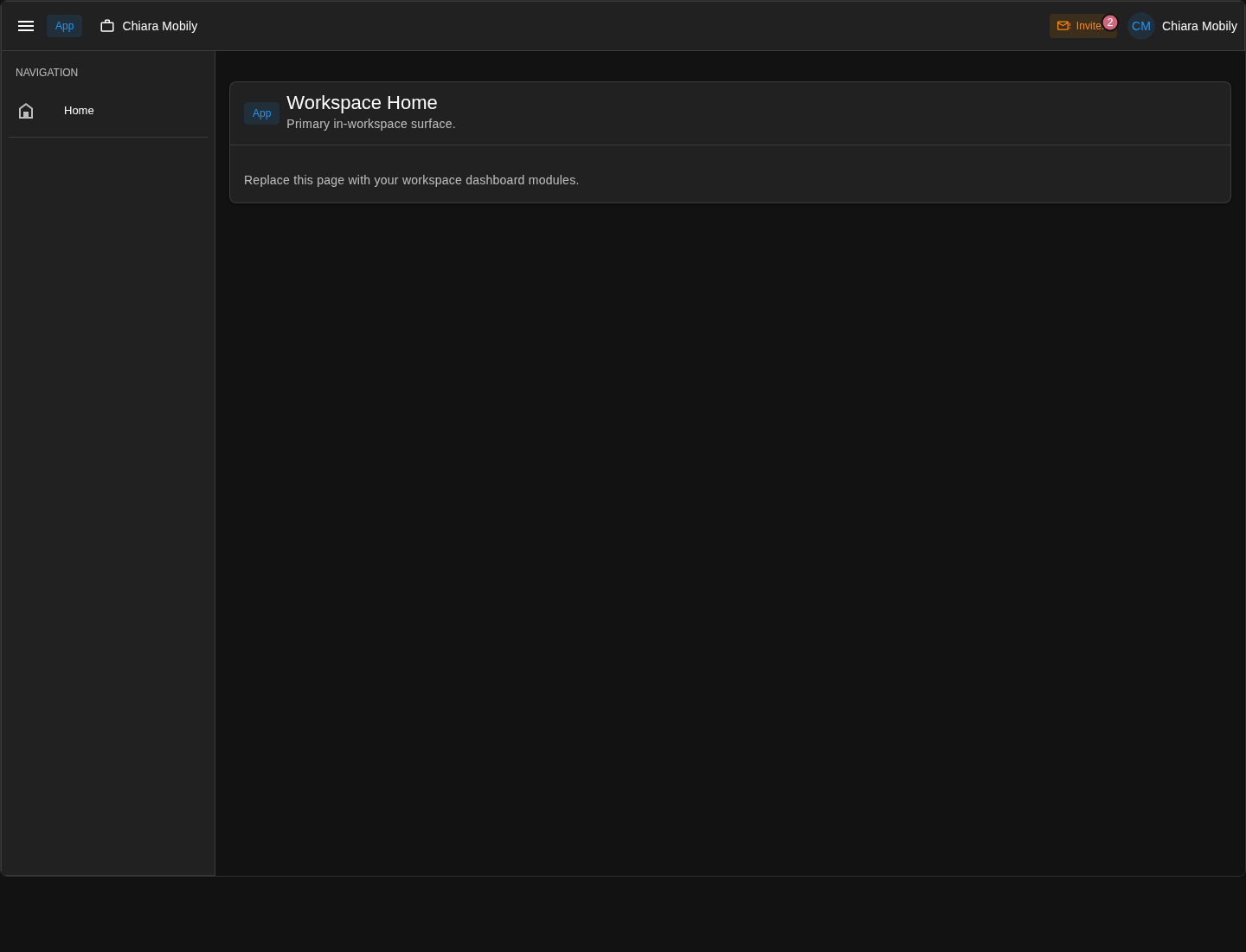
Then open your personal workspace route. The page itself is deliberately light. src/pages/w/[workspaceSlug]/index.vue mostly exists to prove that the app surface is real and ready to host later modules.
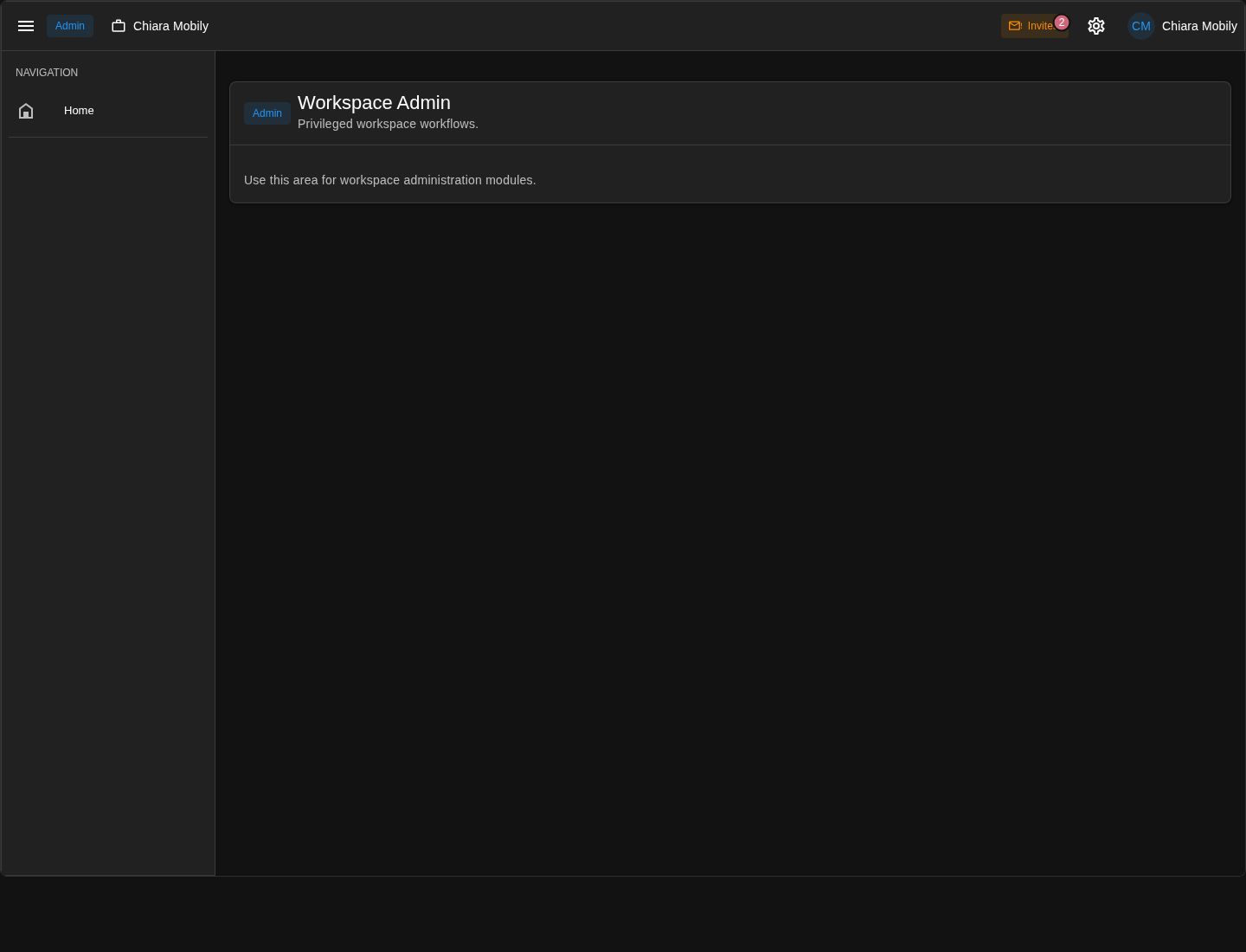
Next open the admin surface for the same workspace. This is the matching pattern on the admin side: src/pages/w/[workspaceSlug]/admin.vue is the shell wrapper, src/pages/w/[workspaceSlug]/admin/index.vue is the starter page, and the workspace tools button is coming from placements rather than being hand-built into that page file.
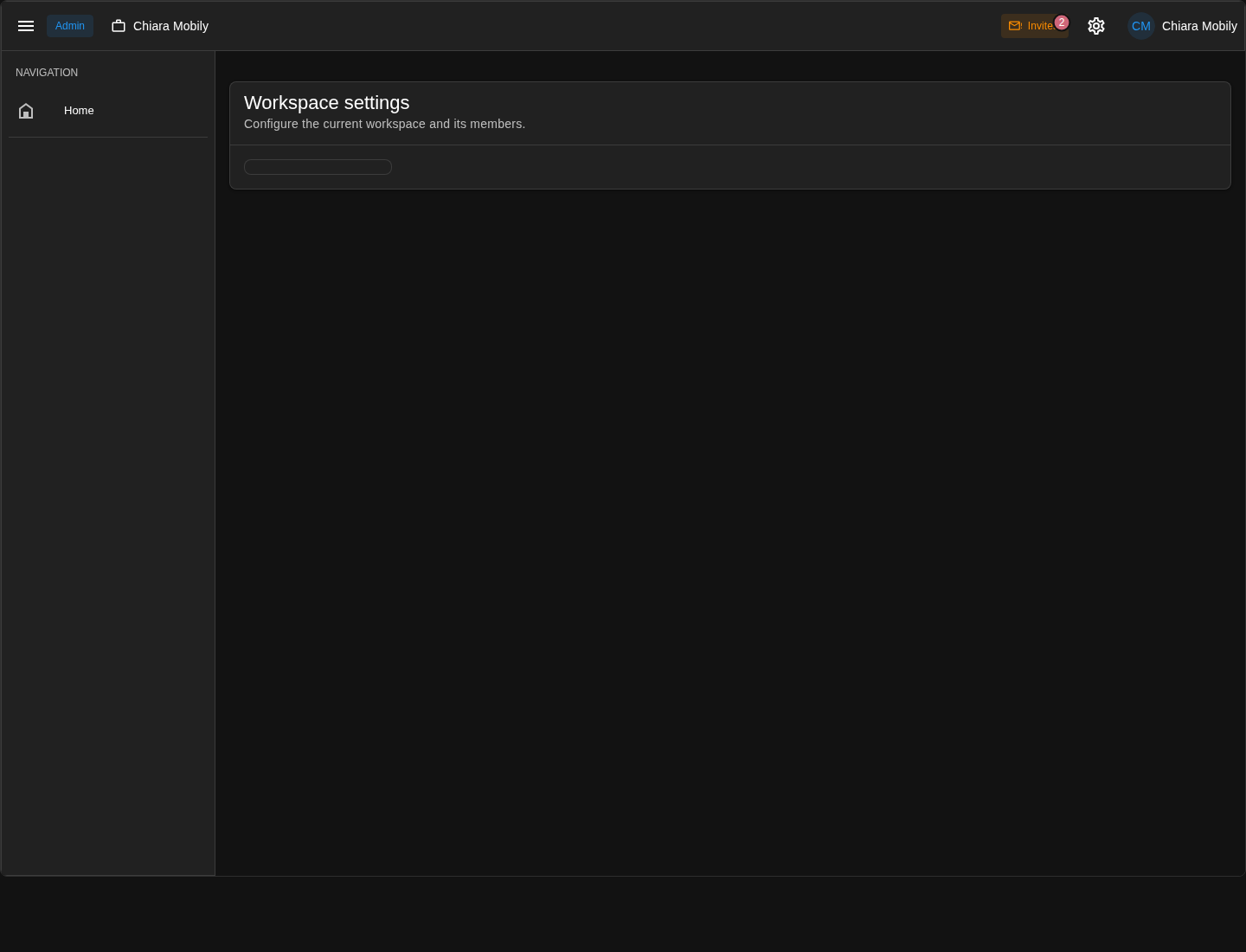
Finally open the nested workspace settings route. This is useful to inspect because it shows the container pattern most clearly. src/pages/w/[workspaceSlug]/admin/workspace/settings.vue owns the section frame and the child outlet, while the actual settings sub-pages can keep arriving later under that shell.
What the workspace packages add to the app
This chapter changes the app in four main places:
- public config
- surface access policies
- migrations
- workspace surface route files and placements
config/public.js changes in a big way
The first change is the explicit tenancy mode:
config.tenancyMode = "personal";Then the app gets two new surface definitions:
config.surfaceDefinitions.app = {
  id: "app",
  label: "App",
  pagesRoot: "w/[workspaceSlug]",
  enabled: true,
  requiresAuth: true,
  requiresWorkspace: true,
  accessPolicyId: "workspace_member",
  origin: ""
};

config.surfaceDefinitions.admin = {
  id: "admin",
  label: "Admin",
  pagesRoot: "w/[workspaceSlug]/admin",
  enabled: true,
  requiresAuth: true,
  requiresWorkspace: true,
  accessPolicyId: "workspace_member",
  origin: ""
};
And the app also gains workspace-level feature config:
config.workspaceSwitching = true;
config.workspaceInvitations = {
  enabled: true,
  allowInPersonalMode: true
};
Those lines are the public contract that tells both client and server that this app is workspace-aware.
config/surfaceAccessPolicies.js gains workspace_member
The new workspace surfaces use a workspace membership rule:
surfaceAccessPolicies.workspace_member = {
  requireAuth: true,
  requireWorkspaceMembership: true
};
This is the first time the guide shows a surface guarded not just by auth or a simple flag, but by real workspace membership.
That is the core idea of multi-homing in JSKIT:
- the route contains a workspace slug
- the server resolves that workspace
- access depends on whether the current user belongs to it
The migrations include workspace schema
After workspaces-core, the migration directory grows again with files such as:
migrations/
  2026..._workspaces-core-initial-schema.cjs
  2026..._users-core-workspace-settings-single-name-source.cjs
  2026..._users-core-workspaces-drop-color.cjs
These are the tables and schema changes that make workspace tenancy real in the database.
That is why the chapter needs another npm run db:migrate. Without those tables, the workspace runtime would have routes and UI, but nowhere to persist workspace membership and settings.
The route tree gains workspace-dependent pages
The app gets:
src/pages/w/[workspaceSlug].vue
src/pages/w/[workspaceSlug]/index.vue
src/pages/w/[workspaceSlug]/admin.vue
src/pages/w/[workspaceSlug]/admin/index.vue
src/pages/w/[workspaceSlug]/admin/members/index.vue
src/pages/w/[workspaceSlug]/admin/workspace/settings.vue
src/pages/w/[workspaceSlug]/admin/workspace/settings/index.vue
That list shows the first real nested workspace topology.
w/[workspaceSlug].vueis theappsurface wrapperw/[workspaceSlug]/index.vueis the starter landing page for theappsurfacew/[workspaceSlug]/admin.vueis theadminsurface wrapperw/[workspaceSlug]/admin/index.vueis the starter landing page for theadminsurfacew/[workspaceSlug]/admin/members/index.vuemounts the first real workspace admin client elementw/[workspaceSlug]/admin/workspace/settings.vueis a local section shell for nested workspace settings routesw/[workspaceSlug]/admin/workspace/settings/index.vueis the default child route for that settings shell
So the workspace surface model is not only a config concept. It becomes a real file-based routing tree in src/pages/.
These files are intentionally thinner than they look.
Most of the machinery happens up-hill from them:
config/public.jsdefines which surfaces exist and which path roots they ownconfig/surfaceAccessPolicies.jsdefines the membership rule that guards themsrc/placement.jswires the selector, invites cue, and admin tools into the shellworkspaces-coreandworkspaces-webprovide the bootstrap, workspace resolution, permissions, settings, and reusable client elements underneath those routes
So the src/pages files are mostly containers and composition points, not the place where workspace tenancy is implemented.
Concretely, that route tree works like this:
w/[workspaceSlug].vueandw/[workspaceSlug]/admin.vueare almost pure wrappers. They tag the route with the correct surface id and mountShellLayoutplus a child<RouterView />.w/[workspaceSlug]/index.vueandw/[workspaceSlug]/admin/index.vueare intentionally simple starter cards. They prove that the new workspace surfaces are live, but they are meant to be replaced by real product modules later.w/[workspaceSlug]/admin/members/index.vueis still thin, but in a different way: it mostly hands control to a packagedWorkspaceMembersClientElement, so the route file stays small while the reusable member-management behavior lives inworkspaces-web.w/[workspaceSlug]/admin/workspace/settings.vueis a section shell. It does not own the actual settings fields. It owns the card frame, the left-side settings menu outlet, and the nested<RouterView />where child settings pages render.w/[workspaceSlug]/admin/workspace/settings/index.vueis intentionally almost empty. Its job is to make/admin/workspace/settingsa real route today and give you a clean place to redirect or add child settings pages later.
If you want to add a real workspace settings child page at this point, use the normal page generator under that route tree:
npx jskit generate ui-generator page \
  w/[workspaceSlug]/admin/workspace/settings/billing/index.vue \
  --name "Billing"
That command does two things:
- it creates
src/pages/w/[workspaceSlug]/admin/workspace/settings/billing/index.vue - it also appends the matching workspace settings menu entry into
src/placement.js
The reason JSKIT can wire that link automatically is that the workspace settings shell already exposes a concrete outlet and topology maps it to semantic section navigation:
<ShellOutlet target="admin-settings:primary-menu" />The route host lets the generator infer page.section-nav with owner admin-settings. src/placementTopology.js then maps that semantic placement to admin-settings:primary-menu and supplies the link renderer for compact, medium, and expanded layouts. So a page generated under w/[workspaceSlug]/admin/workspace/settings/... automatically lands in the left-side workspace settings menu without you hand-writing the placement entry.
Workspace pages are prepared for missing-workspace states
The starter workspace pages already use a dedicated unavailable-state helper:
<WorkspaceNotFoundCard
  v-if="workspaceUnavailable"
  :message="workspaceUnavailableMessage"
  surface-label="App"
/>
That is worth noticing because it shows that workspace routing is not just string matching on [workspaceSlug]. The runtime is expected to decide whether the requested workspace is actually valid and accessible.
This is another example of the "mostly containers" pattern. The page file does not resolve the workspace itself. It asks the shared useWorkspaceNotFoundState() helper for the current workspace-bootstrap status and then swaps between:
- a shared unavailable card when the workspace is missing or inaccessible
- the local starter content when the workspace context is valid
So the starter pages already distinguish:
- valid workspace context
- invalid or inaccessible workspace context
The public workspace client API for custom pages
At this point in the chapter, it is worth separating two different kinds of client-side helpers:
- app-owned scaffold helpers written into
src/ - public package helpers exported by
@jskit-ai/workspaces-web
useWorkspaceNotFoundState() belongs to the first group. It is an app-owned helper scaffolded into:
src/composables/useWorkspaceNotFoundState.jsThat makes it easy to customize locally.
The main app-author-facing helper exported by workspaces-web itself is:
import { useWorkspaceRouteContext } from "@jskit-ai/workspaces-web/client/composables/useWorkspaceRouteContext";That is the public composable most custom workspace pages should reach for first.
What workspaces-web actually exposes publicly on the client side
Today, the public client surface is intentionally small.
@jskit-ai/workspaces-web/client- the package's client runtime registration surface
- exports
clientProviders,WorkspacesWebClientProvider, andWorkspaceMembersClientElement
@jskit-ai/workspaces-web/client/composables/useWorkspaceRouteContext- the main public page-level composable for workspace-aware route context
That is a useful distinction.
WorkspacesWebClientProviderandclientProvidersare runtime wiring, not something a normal page imports.WorkspaceMembersClientElementis a packaged feature element that a route can render directly.useWorkspaceRouteContext()is the public helper most app-authored workspace pages will actually use.
There are other helpers inside the package source, but if they are not exported by the package, treat them as internal implementation details rather than app code API.
What useWorkspaceRouteContext() gives you
The composable returns:
route- the live Vue Router route object
routePath- the normalized runtime pathname
currentSurfaceId- the resolved current surface id, such as
apporadmin
- the resolved current surface id, such as
workspaceSlugFromRoute- the current workspace slug, but only when the current route really belongs to a workspace-dependent surface
placementContext- the current shell placement/bootstrap context
mergePlacementContext- the function used to merge new context back into the shell runtime
For most custom pages, the two values you care about most are:
workspaceSlugFromRoutecurrentSurfaceId
Why use it instead of reading $route.params.workspaceSlug directly
For a very simple page, reading the raw route param can work.
But useWorkspaceRouteContext() is the better default for workspace-aware app code because it does more than "read a param":
- it resolves the current surface through the shell placement/runtime context
- it normalizes the current route path before extracting anything
- it only returns a workspace slug when the current surface is actually workspace-scoped
- it works the same way on both workspace surfaces,
appandadmin
That means your page logic stays aligned with the same route model that the packaged workspace components use internally.
In other words:
$route.params.workspaceSlugis a raw route detailuseWorkspaceRouteContext()is a workspace-aware view of the current route
A concrete custom page example
Suppose you create a real admin page at:
src/pages/w/[workspaceSlug]/admin/reports/index.vueand that page needs to:
- know which workspace it is looking at
- know that it is running on the
adminsurface - build a workspace-scoped API request or query key
That is exactly the kind of page useWorkspaceRouteContext() is for:
<script setup>
import { computed } from "vue";
import { usePaths } from "@jskit-ai/users-web/client/composables/usePaths";
import { useWorkspaceRouteContext } from "@jskit-ai/workspaces-web/client/composables/useWorkspaceRouteContext";

const { workspaceSlugFromRoute, currentSurfaceId } = useWorkspaceRouteContext();
const paths = usePaths();

const reportsApiPath = computed(() => {
  if (!workspaceSlugFromRoute.value) {
    return "";
  }

  return paths.api("/reports", {
    params: {
      workspaceSlug: workspaceSlugFromRoute.value
    }
  });
});

const queryKey = computed(() => ([
  "workspace-reports",
  currentSurfaceId.value,
  workspaceSlugFromRoute.value
]));
</script>
That pattern is intentionally boring in the right way.
- the page does not hard-code path parsing rules itself
- the page gets a normalized workspace slug from the public workspace helper
- the query key can still distinguish between
appandadminwhen needed
The same composable works just as well in a custom workspace app page under:
src/pages/w/[workspaceSlug]/index.vueor any later child page below that surface.
When you need the rest of the returned context
Most custom pages only need:
workspaceSlugFromRoutecurrentSurfaceId- maybe
route
The other returned values are there for more advanced cases.
placementContextmatters when a page needs to read the current shell/bootstrap context directly, for example available workspaces or current permissions already in the shell state.mergePlacementContextis for pages that need to push refreshed workspace data back into the shell runtime after a fetch or save.
That second case is real, but it is more advanced. It is available for app-owned workspace pages that intentionally need to push refreshed workspace state back into shell-visible context after a save.
For normal custom page code, you usually do not start there. Start with workspaceSlugFromRoute.
src/placement.js becomes workspace-aware
The workspace packages append a new block of placements:
addPlacement({
  id: "workspaces.profile.menu.surface-switch",
  target: "auth.profile-menu",
  kind: "component",
  surfaces: ["*"],
  order: 100,
  componentToken: "workspaces.web.profile.menu.surface-switch-item",
  when: ({ auth }) => Boolean(auth?.authenticated)
});

addPlacement({
  id: "workspaces.workspace.selector",
  target: "shell.identity",
  kind: "component",
  surfaces: ["*"],
  order: 200,
  componentToken: "workspaces.web.workspace.selector",
  props: {
    allowOnNonWorkspaceSurface: true,
    targetSurfaceId: "app"
  },
  when: ({ auth }) => {
    return Boolean(auth?.authenticated);
  }
});

addPlacement({
  id: "workspaces.account.invites.cue",
  target: "shell.status",
  kind: "component",
  surfaces: ["*"],
  order: 850,
  componentToken: "local.main.account.pending-invites.cue",
  when: ({ auth }) => Boolean(auth?.authenticated)
});

addPlacement({
  id: "workspaces.workspace.tools.widget",
  target: "shell.status",
  kind: "component",
  surfaces: ["admin"],
  order: 900,
  componentToken: "workspaces.web.workspace.tools.widget"
});

addPlacement({
  id: "workspaces.workspace.menu.workspace-settings",
  target: "admin.tools-menu",
  kind: "component",
  surfaces: ["admin"],
  order: 100,
  componentToken: "workspaces.web.workspace-settings.menu-item"
});

addPlacement({
  id: "workspaces.workspace.menu.members",
  target: "admin.tools-menu",
  kind: "component",
  surfaces: ["admin"],
  order: 200,
  componentToken: "workspaces.web.workspace-members.menu-item"
});
That one block explains a lot of the workspace shell behavior.
- the authenticated profile menu can switch into workspace surfaces
shell.identitycarries the workspace selectorshell.statuscan show a pending-invites cue- the admin surface gets workspace tools through
shell.status - the admin surface gets a workspace tools menu with
SettingsandMembers - the workspace settings shell exposes its own nested menu host for app-owned settings child pages
If you want to add your own app-owned page into that top cog menu, first ask JSKIT which semantic placements exist:
npx jskit list-placementsIn a workspace-enabled app, that list includes:
- admin.tools-menu: Admin surface tools menu actions.If you want the underlying outlet inventory, use npx jskit list-placements --concrete. If you want more package context, npx jskit show @jskit-ai/workspaces-web --details also shows the topology plus the default Settings and Members entries already targeting it.
Once you know the semantic placement id, generate the page like this:
npx jskit generate ui-generator page \
  w/[workspaceSlug]/admin/catalogue/index.vue \
  --name "Catalogue" \
  --link-placement admin.tools-menu
That command creates src/pages/w/[workspaceSlug]/admin/catalogue/index.vue and appends the matching link entry into src/placement.js.
--link-placement is necessary here because this route is just a normal admin page. It is not a child page under a local host like w/[workspaceSlug]/admin/workspace/settings.vue, so the generator has no nested settings placement to infer automatically. If you omit --link-placement, the new page link falls back to the app's default shell.primary-nav placement instead of the cog menu.
You also do not need a renderer flag here. admin.tools-menu defines its link renderer in topology, so JSKIT resolves that when it renders the placement entry.
So the placement system from the shell chapter is doing the same job with a richer routing and tenancy context.
The local client provider gets one more app-owned token
workspaces-web also appends an app-owned component registration:
registerMainClientComponent("local.main.account.pending-invites.cue", () => AccountPendingInvitesCue);That is the pending-invites cue used in the shell when workspace invitations exist.
This is worth noticing because it follows the same app-owned token pattern the guide has shown before:
- the package installs an app-owned component file
- the app-local provider publishes it under a stable token
- placements can then render it through the shell
Under the hood
workspaces-core plugs into the users profile-sync registry
There is also an important server-side integration point that is easy to miss if you only look at routes and pages.
In the previous chapter, users-core introduced the tagged profile-sync lifecycle registry that runs after a JSKIT user record has been synchronized from auth. workspaces-core uses that seam by registering a contributor:
registerProfileSyncLifecycleContributor(app, "workspaces.core.profileSyncLifecycleContributor", (scope) => {
  const workspaceService = scope.make("workspaces.service");

  return Object.freeze({
    contributorId: "workspaces.core.profileSync",
    order: 100,
    async afterIdentityProfileSynced({ profile, options } = {}) {
      if (!profile || typeof workspaceService?.ensureProvisionedWorkspaceForAuthenticatedUser !== "function") {
        return;
      }

      await workspaceService.ensureProvisionedWorkspaceForAuthenticatedUser(profile, options);
    }
  });
});
That means the workspace package does not need to patch auth directly to learn that a user was added. It listens through the users-core lifecycle registry instead.
For this chapter's tenancyMode = "personal" setup, that contributor does real work. When an authenticated JSKIT user is synchronized from auth, workspaces-core ensures that user's personal workspace exists.
That detail matters for the retrofit path described earlier in this chapter. If the app started on none, then later switched to personal, the first sign-in after that switch still needs to backfill the personal workspace for the already-existing user record. The lifecycle contributor handles that because the workspace provision step is idempotent.
users-coreowns the "user was synchronized" lifecycleworkspaces-coresubscribes to that lifecycle through the registry- tenancy policy decides whether the workspace layer provisions a personal workspace automatically
So even in this chapter, the package boundary is already correct: users owns user creation/sync, and workspaces reacts through an extension point.
Workspace auth context comes from the auth policy resolver registry
There is a second registry seam in this chapter that matters just as much for the runtime model.
Workspace-aware routes do not hard-code workspace lookup inside the auth plugin itself. Instead, workspaces-core registers an auth policy context resolver contribution, and auth-core composes the registered resolvers at request time.
The important consequence is:
auth-corestays genericworkspaces-corecontributes workspace-specific context- the request only resolves workspace membership and permissions when a route actually asks for auth context or permissions
So the flow is:
- a workspace-aware route declares auth and, when needed, permission requirements
- the auth policy runtime authenticates the actor
- the composed auth policy context resolver asks the workspace layer for the current workspace context
- the request gains normalized
workspace,membership, andpermissionsvalues
That is why the workspace package does not need to patch the auth plugin directly, and it is also why this setup scales better than a one-off global hook. It uses the same tagged-registry pattern as other JSKIT extension seams, but for request-time auth context instead of bootstrap payloads or lifecycle events.
Why this chapter is the real routing pivot
Earlier chapters added features inside a flat top-level app.
This chapter is different. It changes the shape of the app itself.
Before:
- global surfaces only
- no workspace slug in routes
- no workspace membership checks
After:
- global surfaces still exist
- workspace-scoped surfaces exist too
- the shell can navigate between workspaces
- access to some surfaces depends on workspace membership
That is why multi-homing deserves its own chapter. It is not just another feature package. It is the moment the app becomes tenancy-aware.
Summary
This chapter is the real routing and tenancy pivot in the guide.
- the app uses
tenancyMode = "personal" workspaces-coreadded the persistent schema and server runtime for workspacesworkspaces-webadded the first workspace-scoped surfaces, shell controls, and the workspace-owned account invites extension
At the end of this chapter, the app has both:
- global surfaces such as
home,auth,account, andconsole - workspace-scoped surfaces such as
/w/[workspaceSlug]and/w/[workspaceSlug]/admin
That is the most important mental shift to keep:
- earlier chapters added features inside one global app shell
- this chapter changed the topology of the app itself
From here on, later modules can add features inside either:
- the global surfaces
- the workspace-specific surfaces