Users
At the end of the previous chapter, the app had a real database runtime, but it still did not have JSKIT's own persistent users layer. Authentication worked, but signed-in people were still only provider identities from the auth layer.
This chapter is where that changes. We install users-web, run the new migrations, and let JSKIT start treating authenticated people as persistent app users rather than only as auth-provider identities.
users-web sounds like a UI package, but it is actually the point where several layers arrive together:
- the persistent users/account data model from
users-core - the account surface and account settings UI
- the switch from provider-only auth profiles to users-backed auth profile projection
This is also the first chapter where the difference between "JSKIT wrote migration files into the app" and "Knex applied those files to the database" becomes important in practice.
Recap from previous chapters
To get back to the same starting point as the end of the previous chapter, run:
DB_HOST=127.0.0.1
DB_PORT=3306
DB_NAME=exampleapp
DB_USER=exampleapp
DB_PASSWORD=secret

npx @jskit-ai/create-app exampleapp --tenancy-mode none
cd exampleapp
npm install

npx jskit add package auth-provider-local-core
npx jskit add package auth-web
npx jskit add package database-runtime-mysql \
  --db-host "$DB_HOST" \
  --db-port "$DB_PORT" \
  --db-name "$DB_NAME" \
  --db-user "$DB_USER" \
  --db-password "$DB_PASSWORD"
npm install
If you are already continuing from the previous chapter, you are already in the right place and can skip that setup.
Installing users-web
From inside exampleapp, run:
npx jskit add package users-web
npm install
npm run db:migrate
The first command adds users-web, but the important part is what arrives with it through its dependency chain.
users-webadds the account-facing UI and client runtime piecesusers-corearrives as a dependency and adds the persistent users/account server layer and schema migrations
npm install downloads those new runtime packages and their dependencies. npm run db:migrate is the crucial step that makes the new tables real in MySQL.
In the normal install flow, JSKIT materializes the managed users-core migration files while the package install is being applied. Then npm run db:migrate is what actually runs those files against MySQL.
What users-web adds
This chapter is the real transition from "authentication exists" to "the app knows about users."
Authentication becomes users-backed
In the database chapter, JSKIT still treated the signed-in person as an auth-provider identity. After installing users-web, JSKIT expects to synchronize authenticated users into real JSKIT tables.
That is the biggest architectural change in this chapter.
- the selected auth provider still owns the auth identity and session
- JSKIT owns a persistent users/account data model in MySQL
So after this chapter, a signed-in user is not only "someone the auth provider knows about." They are also a persistent JSKIT-side user with settings and profile state in the app database.
The app gets an authenticated account surface
The app has an authenticated surface at /account.
This is where the starter account settings UI lives. It already has real sections for:
- profile
- preferences
- notifications
Later chapters can extend this account screen with more sections. For example, the multi-homing chapter adds workspace invitation UI through workspaces-web, not through users-web itself.
The important point is that this is a real account route, not a placeholder. It is the first app-owned screen that assumes there is a persistent user model behind it.
The shell changes for signed-in users
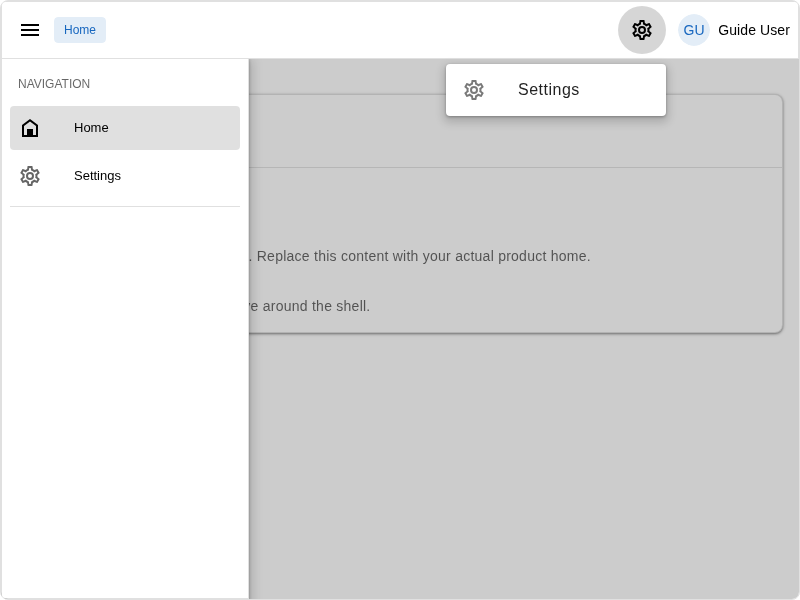
Once a user is signed in, the shell becomes noticeably richer.
- the profile menu gets a
Settingsentry that leads to/account - the home surface gets a small users tools widget in
shell.status - the auth bootstrap payload includes persistent user settings instead of only the fallback mirror data
So this chapter is also the first one where logging in changes more than just "guest vs signed in." It changes what persistent user-facing surfaces the app can expose.
What to look at in the browser
Start both processes again:
npm run dev
npm run server
Then sign in through http://localhost:5173/auth/login.
After a successful sign-in, check these concrete differences compared with the previous chapter:
- the profile menu contains
Settings shell.statusincludes the users tools widget/accountexists and is authenticated
This is the first chapter where the app starts to feel like it has a real user model behind it.
What users-web adds to the app
The most interesting files are spread across config, migrations, routing, and the app-owned account UI.
users-core projects auth identities into app users
The most important server-side change is the provider-neutral projector binding from users-core:
if (!app.has("auth.profile.projector")) {
  app.singleton("auth.profile.projector", (scope) => scope.make("users.profile.sync.service"));
}
That one binding explains the deepest change in the chapter.
Before this chapter, auth could authenticate a user without creating a persistent app-owned user row. After this chapter, auth providers can call auth.profile.projector.syncIdentityProfile(...) and get back a persistent users-backed profile.
users-core also writes this server-only config line for Supabase compatibility:
config.auth ||= {};
config.auth.profileMode = "users";
The local provider uses the token directly. The Supabase provider also understands config.auth.profileMode = "users" and resolves the same users-backed sync service. In both cases, this only works because users-core installs the required repositories, services, and tables.
migrations/ stops being mostly empty
After users-web, the app gets real schema files such as:
migrations/
  2026..._users-core-generic-initial-schema.cjs
  2026..._users-core-profile-username-schema.cjs
These files are the first real database schema in the guide.
The important initial migration creates:
usersuser_settings
That is why this chapter needs npm run db:migrate in a much more serious way than the previous one did.
config/public.js gains one new authenticated surface
After the install, config/public.js grows one important surface definition:
config.surfaceDefinitions.account = {
  id: "account",
  label: "Account",
  pagesRoot: "account",
  enabled: true,
  requiresAuth: true,
  requiresWorkspace: false,
  origin: ""
};
This chapter keeps the split simple:
accountis the normal authenticated user area- operator surfaces such as
consoleare introduced later, by packages that actually own them
src/placement.js grows account entries
The placement registry also becomes more interesting:
addPlacement({
  id: "users.profile.menu.settings",
  target: "auth.profile-menu",
  kind: "link",
  surfaces: ["*"],
  order: 500,
  props: {
    label: "Settings",
    to: "/account"
  },
  when: ({ auth }) => Boolean(auth?.authenticated)
});
This chapter is the first one where one package install adds meaningful authenticated shell entries and a real account surface.
src/pages/account/index.vue is a real authenticated route
The account route itself is very small:
<route lang="json">
{
  "meta": {
    "guard": {
      "policy": "authenticated"
    }
  }
}
</route>

<template>
  <AccountSettingsClientElement />
</template>

<script setup>
import AccountSettingsClientElement from "@jskit-ai/users-web/client/components/AccountSettingsClientElement";
</script>
That is a very JSKIT-style file.
- the route policy is app-owned
- the page wrapper is app-owned
- the heavy UI is delegated to a package-owned reusable client element
So the route is simple, but it is already a real authenticated account screen rather than a placeholder card.
The account screen itself is scaffolded app-owned UI
The account page is backed by:
src/components/account/settings/
  AccountSettingsProfileSection.vue
  AccountSettingsPreferencesSection.vue
  AccountSettingsNotificationsSection.vue
Those three section components stay app-owned so you can reshape the actual UI freely.
The host itself lives in users-web and resolves every account section through the semantic settings.sections placement with owner account-settings, including the default profile, preferences, and notifications entries.
So the screen follows the same rule as the rest of JSKIT UI: sections are added by placement rather than being hardcoded into an app-owned host component.
That is worth noticing because this is a higher level of scaffolding:
- earlier chapters mostly introduced shells and routes
- this chapter introduces app-owned leaf section UI while the generic section host stays in the package
Under the hood
Why auth uses the users layer
In the previous chapter, auth did not have a users-backed projector. The core logic in registerUsersCore() looks like this:
app.singleton("users.profile.sync.service", (scope) => {
  return createAuthProfileSyncService({
    userProfilesRepository: scope.make("internal.repository.user-profiles"),
    userSettingsRepository: scope.make("internal.repository.user-settings"),
    lifecycleContributors: resolveProfileSyncLifecycleContributors(scope)
  });
});

if (!app.has("auth.profile.projector")) {
  app.singleton("auth.profile.projector", (scope) => scope.make("users.profile.sync.service"));
}
The important part is concrete.
After users-web:
users-coresuppliesusers.profile.sync.serviceusers-corealiases that service asauth.profile.projector- the migrations supply the required tables
So auth has everything it needs to stop returning only provider-owned profile data and start using the persistent users-backed profile.
That is the true point of this chapter. The app is not just authenticated. It has a real users layer.
users-core also owns the profile-sync lifecycle registry
There is one more seam worth noticing here because later packages depend on it.
The important thing to understand is that the public extension API is:
registerProfileSyncLifecycleContributor(...)That is the function another server package uses when it wants to run logic after JSKIT has created or synchronized a user record.
If you were writing another server package and wanted to run some logic every time a JSKIT user is synchronized, you would register a contributor during package boot:
import { registerProfileSyncLifecycleContributor } from "@jskit-ai/users-core/server/profileSyncLifecycleContributorRegistry";

function registerExampleCore(app) {
  registerProfileSyncLifecycleContributor(app, "example.core.profileSyncLogger", () => {
    return {
      contributorId: "example.core.profileSyncLogger",
      order: 0,
      async afterIdentityProfileSynced({ profile, created } = {}) {
        if (!profile) {
          return;
        }

        if (created) {
          console.log("Created JSKIT user:", profile.id, profile.email);
          return;
        }

        console.log("Synchronized existing JSKIT user:", profile.id, profile.email);
      }
    };
  });
}
That example is deliberately simple, but it shows the real usage pattern:
- import
registerProfileSyncLifecycleContributor(...) - call it from your package's server registration code
- implement
afterIdentityProfileSynced(...) - use
createdto tell "brand-new user" apart from "existing user synchronized again"
In a real package, the same seam is useful for things like:
- provisioning related rows when a user is created
- seeding package-owned settings
- writing audit events
- attaching app-owned resources to the new user
This runs on the server, inside the same overall sync flow. So if your contributor throws, the sync fails too. That is intentional: the seam is for real lifecycle work, not best-effort UI decoration.
Under the hood, users-core wires those contributors into the users-backed profile sync service. registerUsersCore() resolves the registered contributors when it builds users.profile.sync.service, and then authProfileSyncService.syncIdentityProfile() runs them after the user row and settings row have been synchronized.
users-coreowns the tagged registry and the execution point- auth still only calls one service:
users.profile.sync.service - other packages extend the post-sync lifecycle by registering contributors
The next chapter uses exactly that pattern. workspaces-core registers a contributor so the workspace layer can react when a new user enters the system.
One forward-looking warning matters here. If this app later changes from tenancyMode = "none" to personal or workspaces, the app-local users scaffold written by users-core also needs to be refreshed. The multi-homing chapter calls out that recovery step explicitly with:
npx jskit update package users-coreThat is not only a workspace-package concern. The generated packages/users/... scaffold itself changes shape when tenancy becomes workspace-aware.
Summary
This chapter is where the app stopped treating signed-in people as only auth-provider identities and started treating them as real JSKIT users.
users-coreinstalled the persistent users/account schema and server layerusers-webinstalled the first real account surface and account settings UI- auth switched from provider-only profile data to the users-backed projection flow
That is why this chapter feels bigger than a normal page install. It changes both the browser experience and the server-side meaning of "a signed-in user."
At the end of this chapter, the app has:
- real JSKIT-side
usersanduser_settingstables - a real authenticated
/accountsurface - a shell that can expose user settings and account tools
The next chapter adds a different kind of surface: not a personal account area, but a privileged operator console.